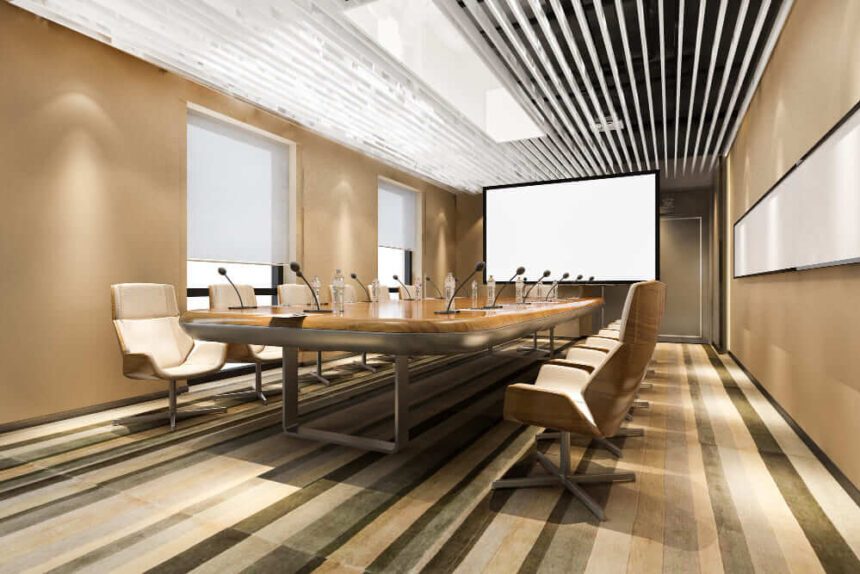
Creating a future-ready conference room starts with the right audio-visual installation. Modern teams need clear sound, sharp visuals, and tools that support both in-person and hybrid collaboration. A well-planned AV setup helps every meeting run smoothly, connect people easily, and prepare the space for new technology.
Technology evolves quickly, so thoughtful design keeps a conference room adaptable instead of outdated. The right equipment layout, cable management, and user-friendly controls make day-to-day use simple. As a result, teams focus more on ideas and less on technical problems.
This guide explains the core elements of building a space that supports today’s demands and tomorrow’s upgrades. It also covers how to maintain smooth performance and improve efficiency through smart technology choices.
Core Elements of Building a Future-Ready Conference Room
A modern workspace depends on clear communication, seamless presentation tools, and technology that adapts to hybrid work demands. Creating a future-ready meeting area involves assessing the physical environment, selecting integrated AV systems, and designing for ongoing flexibility and growth.
Strategic Planning and Room Assessment
Effective design starts with understanding how teams use the room. Purpose defines layout, furniture, and acoustic choices. For instance, board meetings need longer tables with centered displays, while collaboration zones need moveable furniture and wide viewing angles.
Planners measure ceiling height, wall distance, natural light, and sound reflection before any conference room AV setup begins. These details affect microphone reach, camera framing, and cable routing. Proper measurements support better sound and video coverage without unnecessary hardware.
Lighting and sight lines matter as much as equipment. A space with balanced lighting reduces glare on displays and improves on-camera appearance. Simple actions such as using acoustic panels or blinds help control echo and light spill. This planning phase reduces future costs because it prevents misalignment between furniture placement and technology.
Selecting the Ideal AV Systems and Components
Choosing AV equipment should match the room’s size and the team’s workflow. Smaller rooms perform better with integrated systems that house cameras, microphones, and soundbars in one device. Medium or large areas benefit from modular systems that separate audio, video, and control units for cleaner distribution and easy upgrades.
Clear communication depends on audio coverage. Ceiling microphones minimize table clutter, while wireless options provide flexibility for reconfigured layouts. Display selection also matters. Interactive touchscreens support active participation, while dual displays help hybrid meetings include remote members clearly.
Compatibility with platforms such as Teams or Zoom adds convenience. Many organizations now expect plug-and-play options that allow users to connect laptops quickly without delays. Planned network integration between AV equipment and IT infrastructure keeps the setup more secure and simpler to manage long-term.
Engineering and AV Setup for Adaptable Spaces
Modern meeting rooms must change with the company’s needs. Engineers combine movable components, adjustable mounts, and modular racks to minimize disruption from future upgrades. Flexible wiring paths and clear labeling also speed up maintenance.
Smart automation increases efficiency. Motion-based lighting, auto-switching inputs, and occupancy sensors save energy and provide insight into space use. Proper calibration of cameras and microphones delivers natural conversations without frequent manual adjustments.
Finally, training staff helps maintain the system’s performance. Teaching them how to adjust brightness, volume, and input connections avoids unnecessary service calls. A thoughtful engineering and setup process gives every meeting a consistent experience while keeping technology current for future demands.
Optimizing Technology and Maintenance for Efficiency
Efficient conference rooms depend on clear communication tools, smooth system integration, and ongoing technical care. The right setup saves time, supports collaboration, and reduces equipment issues that slow meetings or disrupt workflow.
Seamless Video Conferencing Integration
Modern meetings rely on smooth video conferencing to connect people in different locations. Systems that link displays, microphones, and cameras with a single control platform make meetings start faster and reduce setup delays. One-touch connection and automatic source recognition reduce user error and keep sessions on schedule.
Compatibility across multiple devices and software platforms helps both internal and guest participants join without extra support. In addition, integrated scheduling with calendars allows rooms to prepare automatically, activating displays or adjusting lighting at the right moment.
Hybrid offices and retail spaces benefit most from unified hardware and software that communicate without conflict. A simple interface keeps attention on the discussion rather than troubleshooting. The goal is not more technology but a smarter configuration that feels intuitive and consistent every time.
Improving Clear Audio and Acoustic Performance
Clear audio defines the quality of communication more than visuals. Poor sound creates confusion, repetition, and frustration for both in-room and remote participants. Acoustic panels, directional microphones, and echo reduction technology prevent overlap and distortion.
Noise control is especially important in retail spaces or large offices where sound travels easily. Using table microphones and ceiling arrays helps catch every voice clearly. Automatic volume adjustment can balance levels so both soft and loud speakers are easy to hear.
Sound isolation materials, such as wall insulation or strategic soft furnishings, further improve clarity. Proper placement of speakers and input devices allows a smoother flow of conversation without delay or interference. A clear listening environment improves decision-making and keeps meetings efficient.
Implementing Automation for User-Friendly Control
Automation makes the conference space simpler to use and reduces manual errors. Centralized room control through a wall panel or tablet can manage lighting, displays, and climate with a single command. Motion or occupancy sensors can also prepare the room automatically before participants arrive.
Voice-activated functions and preset room modes allow quick adjustments without technical help. For example, a “presentation” mode might lower lights, switch the display input, and activate microphones in seconds. This saves time and removes the need to handle multiple settings separately.
Automation must balance convenience with security. Password protection and user authentication prevent unauthorized access while still giving legitimate users easy operation. A user-friendly, secure setup keeps the environment smooth and consistent for frequent use.
Preventive Maintenance and Long-Term Support
Even the best technology fails without consistent care. Preventive maintenance schedules help identify potential faults before they cause interruptions. Regular inspections of cables, connections, and software updates keep systems current and responsive.
Technicians should document performance issues and track common wear points like projector lamps or microphone batteries. Scheduled cleaning of equipment surfaces also helps maintain image and sound quality.
Support teams should review usage data to determine if upgrades or replacements are necessary. In retail or high-traffic environments, this level of attention extends the lifespan of expensive AV assets. A well-maintained system keeps meetings productive, minimizes downtime, and supports future growth.
Conclusion
A future-ready conference room depends on thoughtful AV design, smart equipment choices, and clear attention to user needs. Each part plays a role in delivering quality visuals and clean audio that support effective communication.
Technology will continue to advance, so flexible systems allow smooth updates without major changes to the space. Regular maintenance, software updates, and staff training also help the setup stay current and dependable.
By combining practical layout planning, ease of use, and scalable AV tools, teams can create a meeting space that works efficiently today and adapts as new technology emerges.